If you wish to complete an SDX e-Signing online then you need to ensure that your browser is able to display PDF content within it. You will have been directed to this help page because your browser was unable to detect the Adobe plug-in and you requested more help.
If you don't have the Adobe reader installed you can get it for free from Adobe by following this link
If you already have the reader installed you can test it's settings by clicking this button
If your test failed then please follow these instructions (note that the menu items may vary depending on your version of Adobe)
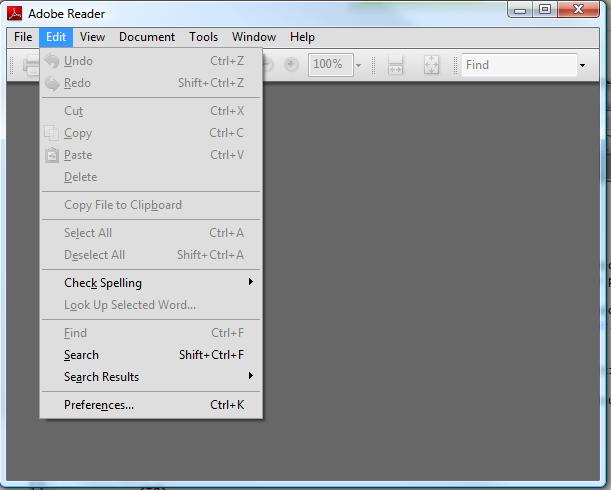
1. Open your Adobe Reader and select the Preferences Item from the Edit menu
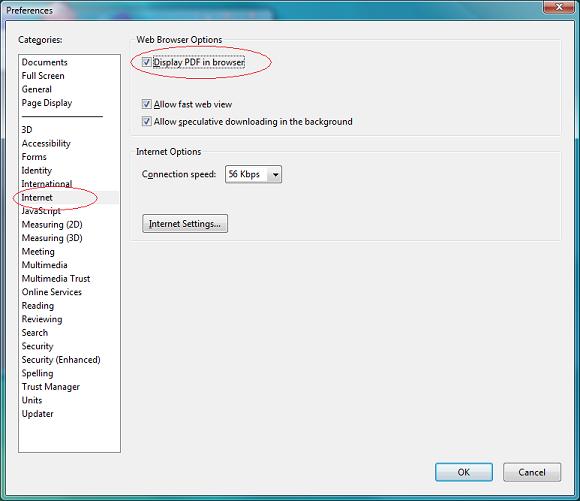
2. Select the Internet menu item, check "Display PDF in browser" and click OK button
3. After the Adobe setup finishes close your reader, REFRESH THIS PAGE (press F5) and you should see a test PDF appear below